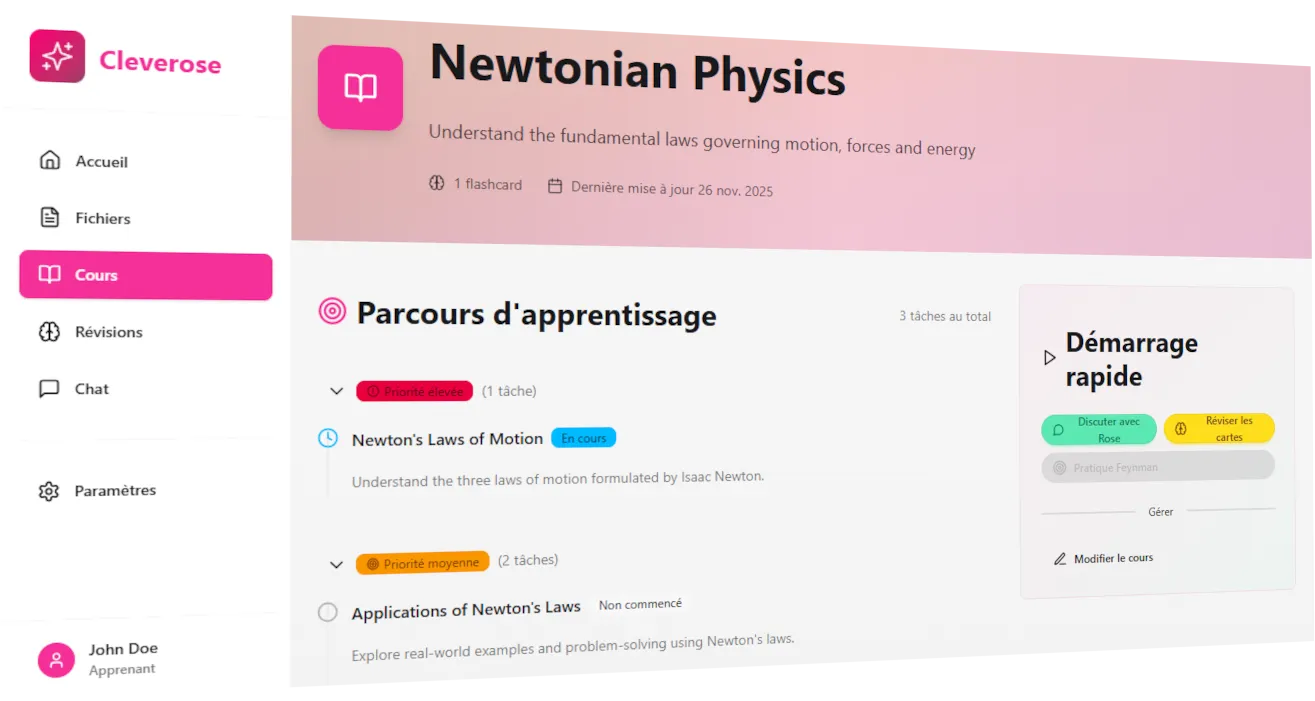
Cleverose
Cleverose is an app to help people learn with AI. It’s a tool leveraging AI to enhance the learning process with:
- personalized tutoring with Rose (the AI Agent)
- automatic creation of learning tools like flashcards
- turning learning into a conversation
Tech Stack: Mastra AI, AdonisJS, Inertia, Daisy UI, Astro (for the static part)
Showcase
You can see the video in french here
Why this project?
1. I wanted to make proven learning methods easier to use/apply as a student. I like learning methods and how they work. In high school I discovered and applied methods like the mind palace - that amazed me. Later I understood it’s not that easy/natural to others to put in place/use
2. Learn to code agentic apps: I wanted to prepare myself to the new skills required around agentic app and was very curious about how all of that works
3. Test AdonisJS: I heard good comments on that framework and I’ve been told it’s the “Laravel of typescript”. I like the Symfony framework so I was curious.
Learnings
Creating an agent that does what you want is not that easy
The most important is the system prompt. It is quite impressive how much it can completely change how your agent behaves. Good system prompts are concise and precise. That way the LLM will not get lost in it and you’ll probably be able to choose a cheaper model. In this app, the system prompt of Rose mainly focuses on defining:
- the mission
- the overall method
- the behavior
- the writing style
- some security precisions
- and context (what is Cleverose, why what the model is doing is important for users, etc…)
In the case of Rose, it was not effective to add all the details about when it should create flashcards or create a learning plan for example. That was confusing the model too much. So I preferred to simplify and just describe the spirit of the method I wanted to use in the app. So you should carefully choose where you are going to put some details: directly in system prompt or in tool descriptions or even in some system messages? Depending on your answer to that question, your agent can perform very differently.
In my case, I decided to put in each tool description:
- what the tool is doing
- strict rules about what should trigger usage of the tool
- strict rules about what should absolutely not trigger usage of the tool
That alone, with the methodology in system promt, somehow improved Rose a lot. It was better “remembering” the logic I wanted it to have.
The cost of such an approach is that your full system prompt that you send to the LLM (system prompt + tool descriptions) will be bigger. But the result is clear: this is a lot clearer to the underlying model. It just means you should be cautious about how many tools you really need. When I switched to this approach I was actually able to reduce the number of tools.
A trick that can help you reduce number of tokens you send to the LLM is to send only the tools it needs. For example, Rose does not receive the description of the tools to read a file if current conversation is not inside a course. So Rose is what Mastra AI calls a dynamic agent.
Once you have polished your system prompt, you’ll be able to pick a model that is the most suited for the task you want to do. I’d say that you should always try to use the smallest model possible for speed and price. For complex tasks, you should use reasoning models. They are smarter and generally support more context tokens. But they are also slower to answer. So make sure to take that into account in your UI/UX.
In that project, I was able to move Rose to a non-reasoning model and get satisfying results after improving my prompt. And it was crucial for the UX of the chat to have the fastest answer possible: it changed the game.
Also, don’t hesistate to use LLMs like Claude, Gemini or ChatGPT to help you refine your prompt - they can be really good at it.
Code with AI
Now the question you want to ask since the beginning: did I use AI in this project? And if yes, how?
Yes I used AI but I tried not to use it everytime. I spent most of the time reading the docs and coding by myself mainly for 2 reasons:
- I wanted to learn
- I don’t think starting a project with AI is a good idea
For the second point, I think having a clean project necessitates really good guidelines for the AI on how you want the code to be written, what are your standards, etc… And actually this is a lot easier to enforce when you already have some way of doing things. But in my case, at the beginning I was discovering a lot of things and had to refactor a lot later.
But I did use AI at some point when I got at simpler steps, I used it for internationalization for example.
A great method to work with AI in my opinion is to use chatGPT and Claude Code together (+ your brain, we still need it currently). Indeed, for more complex tasks I really like the following flow:
- define what I want and describe it out loud to chatGPT
- iterate with chatGPT to get a specification document
- Send that document to Claude Code in plan mode
- Iterate with Claude until I agree with the plan
- Let’s code
The second and third points are similar but there is a very important difference:
- the first is more product centered. I think about what I want in the long term and what I will do now in short term to start in the right path.
- the second is more about technical implementation. As claude code has access to the codebase, we can explore the codebase faster and I can take technical decisions at that time.
I think it’s a very interesting exercise for developers to think more about the product, the UI and the UX.
With this method I designed and implemented a part of the onboarding screens for example. For some details I still had to jump in and code it myself but it was at the end of the project, I wanted to finish it and AI definitly helped go faster.
Others
It was my first time using i18n in a project! It’s a little bit cumbersome to put in place (and I had to do it for static site and the app…) but I can see the benefits. In my next projects I think I will consider it sooner.
AdonisJS and Inertia are actually great! You can do whatever you want with it. In terms of backend development experience I still prefer Symfony but AdonisJS is really really close.
DaisyUI is wonderful! Try their theme editor.
What next?
Here is a small list of what I would do differently:
- Better project organization
- Better organize monolith, add husky earlier for example
- Better task management: it was a difficult start
- Better tests and eval of AI from the start
Sometimes we feel spending time on organization and direction is a waste of time but it’s actually the opposite, starting head first on a project without thinking about that actually delays it.
To me a project needs a long term vision and a short term goal; and that can be the direction. It does not mean that all the technical challenges must be sorted out - because all the fun is figuring them out - but at least know where you’re going with it!
For Cleverose I might continue developping it but I’m taking a small break for now. I have other less technical projects I might tackle before (no spoil but I might write about that too at some point)!
I’m happy with the current result, it’s not the “long term vision” but it’s a good start in my opinion and I can push the project to it when I have time. In the meantime please test it, try to push it to it’s limits and learn something with it. And then send me an email with all the bugs that you found out!
Thanks for reading, see you for the next project!
PS: here is the link to test it https://cleverose.com/ (and here is link in french: https://cleverose.com/)